

GitLab 升級筆記

2025-12-06 更新: 更新 GitLab 備份指令,原先指令已經棄用,並新增簡易更新流程與新的移難排解。
前言
前陣子接觸自架 GitLab 伺服器,時至今日已經累積了一些 Common Vulnerabilities and Exposures (CVE),GitLab 有在更新日誌中整理出清單,其中不乏嚴重或高等級的風險,因此是時候升級版本了。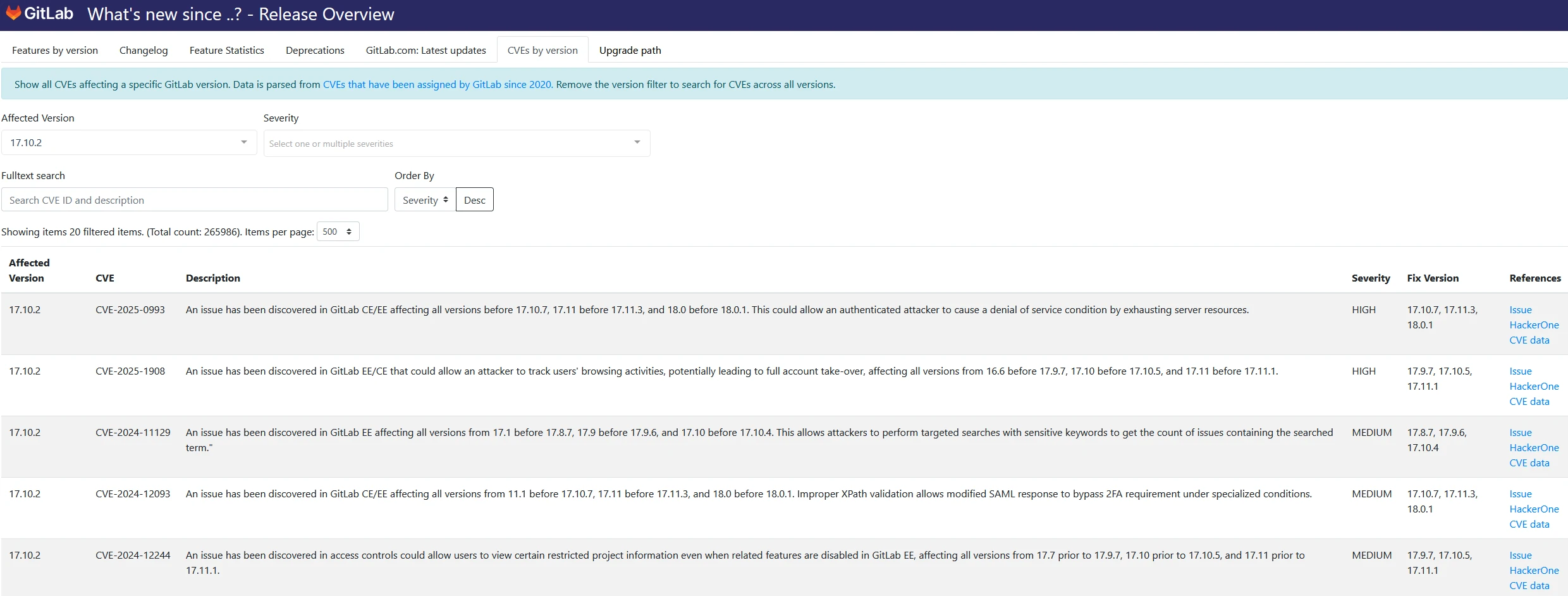
在升級前我去看了一下官方的升級文件,看到了一句話:
看不懂英文沒關係,我來翻譯:
但,有那麼簡單嗎?怎麼我踩的坑就特別多、特別不簡單呢!???
繼續往下看文件,還發現文件列出了 17 個升級步驟: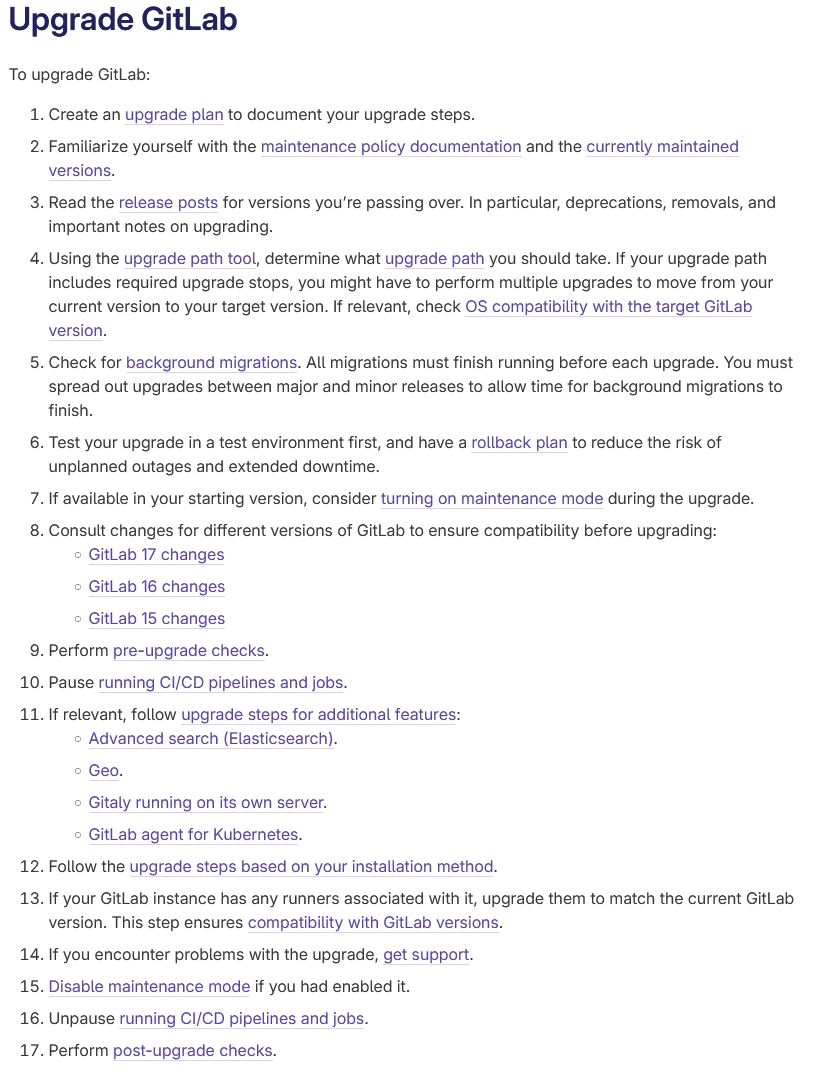
在升級過程中踩了各種坑,因此藉此機會來記錄一下我的更新方式。
升級步驟
GitLab 升級是無法直接更新到最新版本的,因此我們需要先至官方的升級路徑工具中看看我們應該怎麼更新。
首先選擇你目前的版本,以及你想要更新的版本。以下列環境為範例:
- Enterprise
17.10.0升級至18.0.1。
- Distro
- Ubuntu
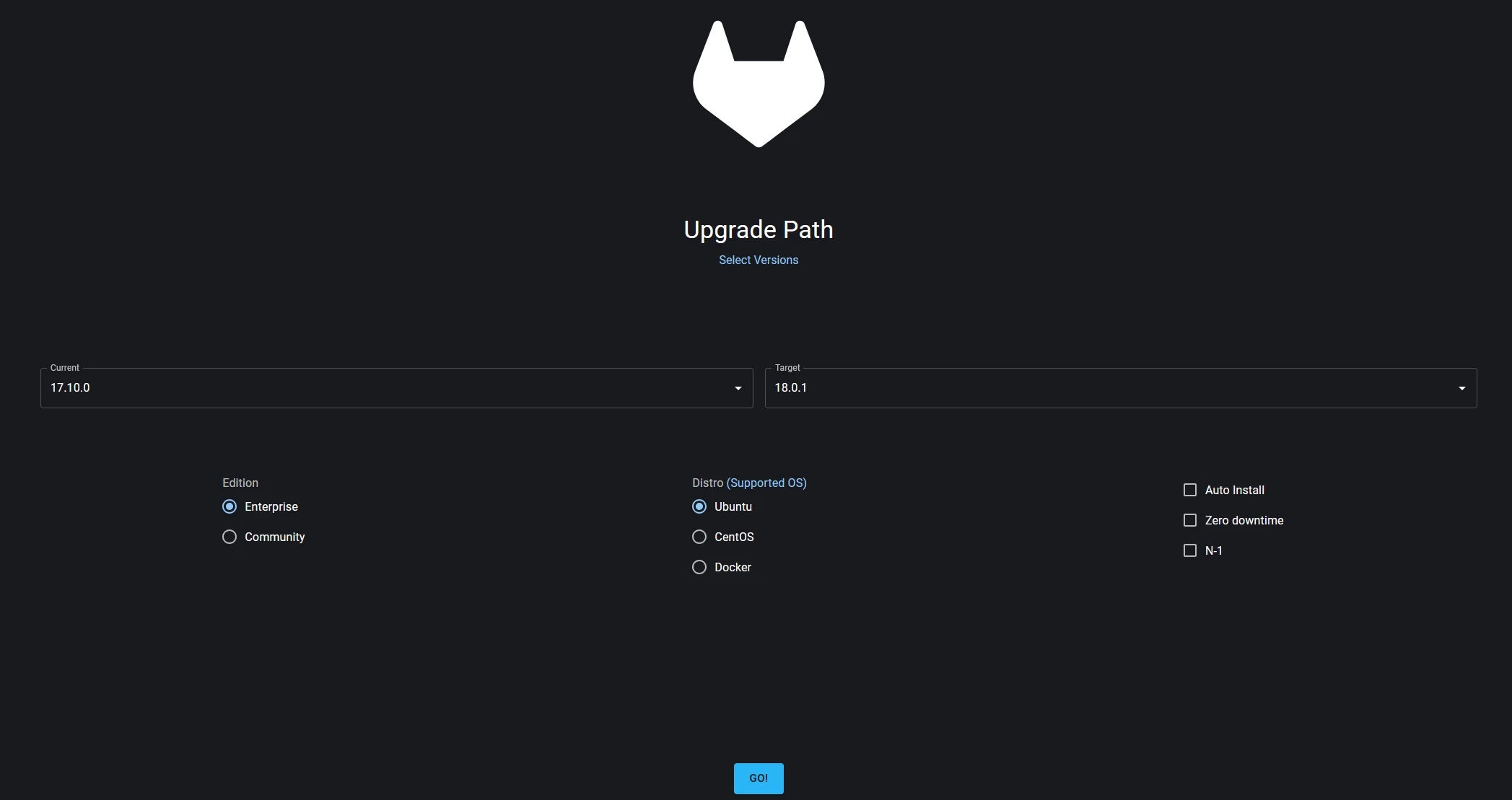
選擇完後點擊 GO! 就可以得到官方建議的升級路徑。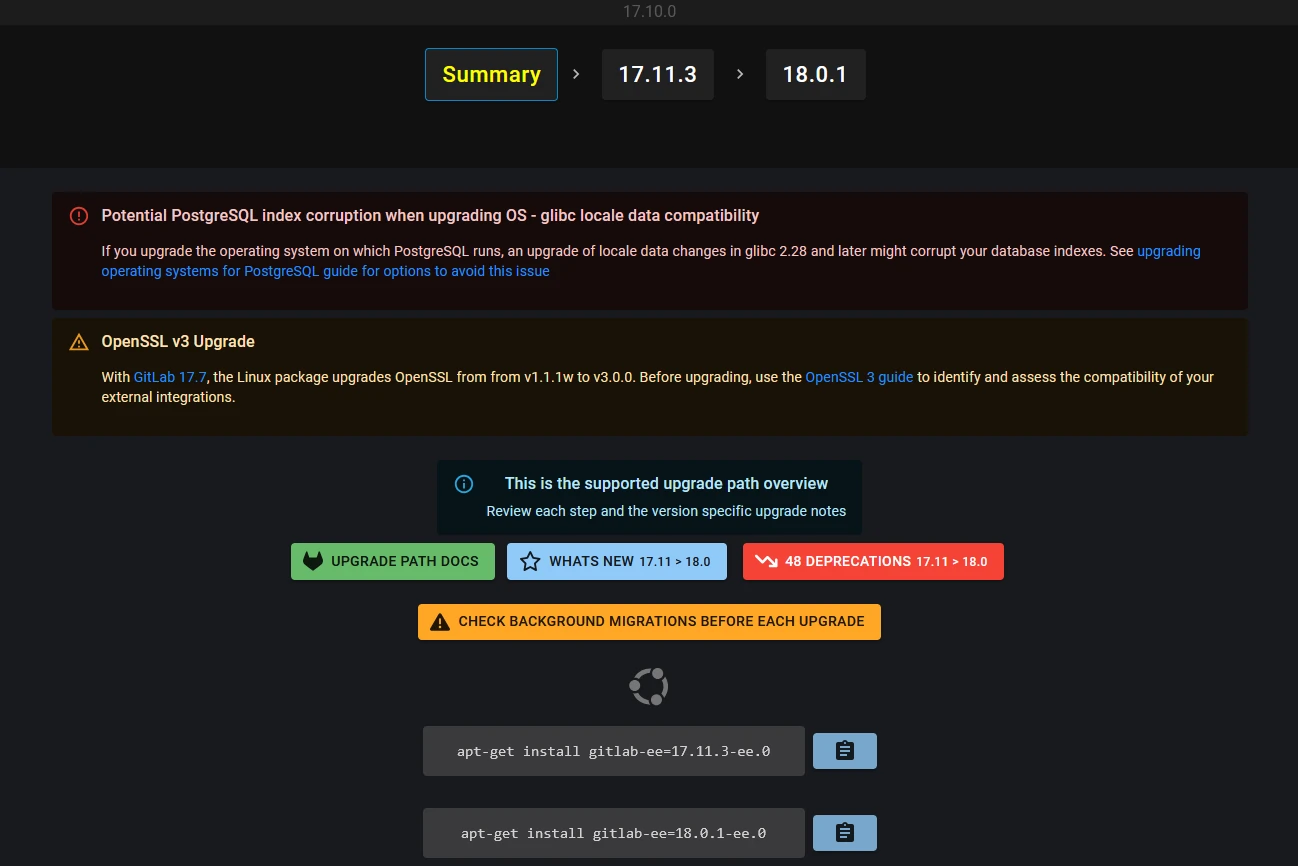
接著我們就依據這個建議的升級路徑來進行升級。
在進行升級操作前,強烈建議先進行備份。以防止資料遺失或系統出錯。
備份方式請依照你的環境抉擇,例如虛擬機器(VM)或實體機器。
前置步驟
- 確認你的系統版本
- 更新套件 meta-data
- 確認 GitLab 的安裝方式
本篇文章會以 apt (Advanced Packaging Tool)安裝為主。
資料備份
- 由於我的環境是 Proxmox VE (PVE)的 VM,因此我會先在 PVE 主機上對 GitLab VM 進行備份。
- 接下來是在 GitLab VM 中對 GitLab 進行備份(備份檔案路徑:
/var/opt/gitlab/backups):
1 | gitlab-backup create |
記錄舊版資訊
確認備份完畢後,可以使用以下指令記錄目前的版本資訊:
1 | gitlab-rake gitlab:env:info | tee -a gitlab-ee-17.10.0_before.txt |
更新版本並記錄資訊
接下來就是正式更新版本了,根據剛剛建議的路徑,我們需要先升級到 17.11.3:
1 | apt install gitlab-ee=17.11.3-ee.0 | tee gitlab-ee-17.11.3_install.txt |
執行這個指令後會開始進行更新,全部的更新流程都會自己進行,等指令跑完即可。
確認狀態並記錄資訊
更新完成後,可以先來確認狀態:
1 | gitlab-rake gitlab:check | tee -a gitlab-ee-17.11.3_check.txt |
確認 Database 是否轉移
接著確認 Database 是否轉移完成(狀態都為 [ up ]):
1 | gitlab-rake db:migrate:status | tee -a gitlab-ee-17.11.3_check_db.txt |
確認更新後版本資訊
確認更新後的版本資訊:
1 | gitlab-rake gitlab:env:info | tee -a gitlab-ee-17.11.3_after.txt |
確認都沒有問題後,即可將 GitLab 服務啟動,並檢查是否正常執行:
1 | gitlab-ctl start |
檢查各元件狀態
最後確認各項元件狀態是否正常:
1 | gitlab-ctl status | tee -a gitlab-ee-17.11.3_status.txt |
繼續升級
當我們完成一個版本升級並確認無異常後即可往下個版本升級,重複剛剛的步驟即可:
- 資料備份
- 記錄舊版資訊
- 更新版本並記錄資訊
- 確認狀態並記錄資訊
- 確認 Database 是否轉移
- 確認更新後版本資訊
- 檢查各元件狀態
如果想跳過一些步驟也是可以的,取決於個人或當下的情況。
最簡單升級流程
- 建立備份
1 | gitlab-backup create |
- 安裝下一個版本
1 | apt install gitlab-ee=xx.xx.x-ee.0 |
- 確認狀態
1 | gitlab-rake gitlab:check |
- 確認 Database 轉移
1 | gitlab-rake db:migrate:status |
- 登入 GitLab 管理員並查看監控 > 後台遷移(
/admin/background_migrations)是否有正在進行中的遷移。等所有遷移變為「已完成」時再進行下一個版本更新。
其他
升級過程中可以利用 Background Migrations 工具查看轉移的狀態。
疑難排解
在更新過程中會出現一些錯誤或問題,這邊提供我遇到的幾個,如果有遇到新的會再更新。
這邊的解決方式是我自己成功解決的,執行所有指令前請注意是否安全。
Public attributes file is missing, run gitlab-ctl reconfigure to re-create it.
可能會出現以下資訊:
1 | Preparing to unpack .../gitlab-ee_17.11.3-ee.0_amd64.deb ... |
原因為缺失相關檔案,因此執行:
1 | gitlab-ctl reconfigure |
執行完畢後再重新安裝一次即可。
卡在 Unpacking gitlab-xx (xx.xx.xx-xx.0) over (xx.xx.xx-xx.0) …
請耐心等候升級,筆者在這邊等了大概快一小時。
ActiveRecord::DatabaseConnectionError:…
可能會出現以下資訊:
1 | rake aborted! |
原因是 PostgreSQL 未啟動導致無法連線,因此執行:
1 | gitlab-ctl start postgresql |
並再執行一次升級指令即可解決問題。
StandardError: An error has occurred, all later migrations canceled: …
可能會出現以下資訊:
1 | StandardError: An error has occurred, all later migrations canceled: |
原因是 Redis 沒有啟動,因此執行:
1 | gitlab-ctl start redis |
並再執行一次升級指令即可解決問題。
PG::CheckViolation: ERROR: no partition of relation “project_daily_statistics_b8088ecbd2”…
可能會出現以下資訊:
1 | PG::CheckViolation: ERROR: no partition of relation "project_daily_statistics_b8088ecbd2" found for row |
可以閱讀以下連結進行問題解決:
- issue-after-upgrade-pg-error-no-partition-of-relation-project-daily-statistics-b8088ecbd2-found-for-row
- 官方的 Workaround
依據後續找出的結果,GitLab 官方似乎已經在著手解決這個問題,因此在未來新版本可能會被修復。
參考資料
- Title: GitLab 升級筆記
- Author: WoodMan
- Created at : 2025-05-27 20:37:13
- Updated at : 2025-12-06 19:40:14
- Link: https://blog.lce-lab.dev/2025/05/27/GitLab-升級筆記/
- License: This work is licensed under CC BY-NC-SA 4.0.